



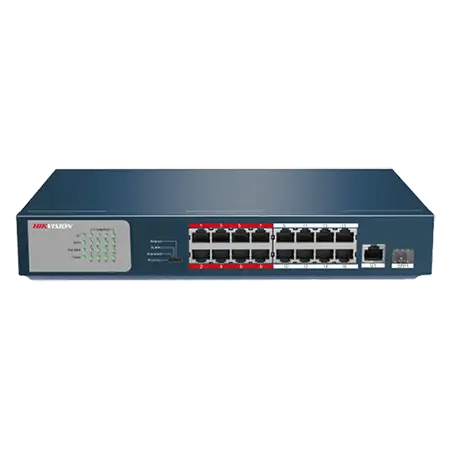
DS-3E0318P-E/M
16-Port PoE Switch, RJ45 + SFP Uplinks
- 16 PoE ports, 135 W budget
- Gigabit RJ45 and SFP uplinks
- Long-range PoE up to 250 m (820 ft)
- Plug and play, no setup
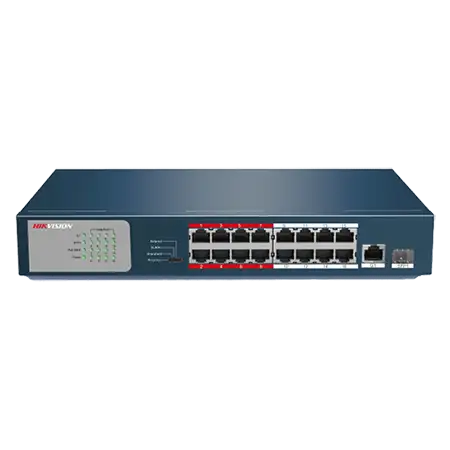
DS-3E0318P-E/M
16-Port PoE Switch, RJ45 + SFP Uplinks
- 16 PoE ports, 135 W budget
- Gigabit RJ45 and SFP uplinks
- Long-range PoE up to 250 m (820 ft)
- Plug and play, no setup
PoE Ports
16 x 10/100 Mbps PoE ports
Non-PoE Ports
1 x 10/100/1000 Mbps uplink ethernet port
SFP Port
1 x 10/100/1000 Mbps uplink SFP port
PoE Standard
IEEE 802.3 af & at high POE power supply
Power Budget
135 W
Switching Capacity
7.2 Gbps
Mac Address Table
4K
Network Modes
Priority, Standard, Isolate and Extend
Key specs
- 16 × 10/100 Mbps PoE ports (802.3af/at)
- 1 × Gigabit RJ45 + 1 × Gigabit SFP uplink
- PoE budget 135 W
- Extend mode on ports 9-16: up to 250 m (820 ft)
|
Network Parameters |
|
|
10/100 Mbps RJ45 |
16 |
|
10/100/1000 Mbps RJ45 |
1 |
|
1000 Mbps SFP |
1 independent |
|
High-priority Port |
Port 1 - 8 |
|
Transmission Speed |
Ethernet: 10 Mbps (Half Duplex) / 20 Mbps (Full Duplex) Fast Ethernet: 100 Mbps (Half Duplex) / 200 Mbps (Full Duplex) Gigabit Ethernet: 2000 Mbps (Full Duplex) |
|
Transmission Medium |
Ethernet: Cat 3 or better UTP/STP Fast Ethernet: Cat 5 or better UTP/STP Gigabit Ethernet: Cat 5 or better UTP/STP 1000 Base-SX: MMF (Multimode optical fiber) 1000 Base-LX: MMF (Multimode optical fiber) or SMF (Single Mode Fiber) |
|
Network Standard |
IEEE 802.3, IEEE 802.3u, IEEE 802.3ab, IEEE 802.3af, IEEE 802.3at, IEEE 802.3x, IEEE 802.3z |
|
Performance |
|
|
Store-and-forward |
Supported |
|
MAC Address Table |
4 k |
|
MAC Learning |
Auto-learning / Auto-aging |
|
Switching Capacity |
7.2 Gbps |
|
PoE Power |
|
|
PoE standard |
IEEE 802.3af, IEEE802.3at |
|
PoE Powering Mode |
Supports 8-pin power supply |
|
PoE Port |
1 - 16 |
|
Maximum Port Output |
30 W |
|
Maximum Total Output |
135 W |
|
Environment |
|
|
Operating Environment |
Operating Temperature: 0 °C ~ 40 °C Operating Humidity: 10% - 90% RH non-condensing |
|
Storage Environment |
Storage Temperature: -40 °C ~ 70 °C Storage Humidity: 5% - 90% RH non-condensing |
Know before you buy
Quick answers about the DS-3E0318P-E/M, and how it compares.
How many cameras can this PoE switch power?
Two limits apply: the number of PoE ports, and the total PoE budget in watts. Add up the maximum power of each camera from its datasheet and keep about 20% spare. Example: 16 cameras at 6 W each need 96 W, plus 20% is about 115 W, so a switch with a 125 W budget or more is right. A PoE port (802.3af) gives up to 15.4 W and a PoE+ port (802.3at) up to 30 W. PTZ cameras and cameras with heaters, strong IR or strobe lights need PoE+ or Hi-PoE (802.3bt). Not sure? Send us your camera list and we size it for you.
What is long-range PoE, up to 300 m?
A normal network cable run is limited to 100 m (330 ft). In long-range (extend) mode the switch lowers the port speed to 10 Mbps, so data and power can travel up to 300 m (1,000 ft) on one good quality copper Cat6 cable. 10 Mbps is enough for one camera, so use this mode for one camera per port, for example at a far gate or along a boundary wall. For longer runs use fiber with SFP modules.
Unmanaged, smart or managed switch: which one do I need?
Unmanaged switches are plug and play, with nothing to set up: good for small systems. Smart (web managed) switches add a web page and app view for VLANs, port status, cable checks and, on many models, PoE watchdog, so you can find and fix problems from your desk. Managed (Layer 2+ or Layer 3) switches add full control, routing and ring protection for large sites, campuses and city projects. For most CCTV jobs with 8 to 48 cameras, a smart PoE switch is the best value. Ask us if you are not sure.
What are the SFP fiber ports for?
SFP and SFP+ ports take a small plug-in fiber module, sold separately. Use them to link the switch to the NVR room or main switch when the distance is over 100 m (330 ft), or between buildings. Fiber carries no electricity, so it also stops surges travelling between buildings. Choose single-mode or multi-mode modules to match your fiber cable, and use a matching pair of modules at the two ends. Ask us for the right modules and cable.