



DS-3E0109P-E/M
8-Port PoE Switch, 58 W
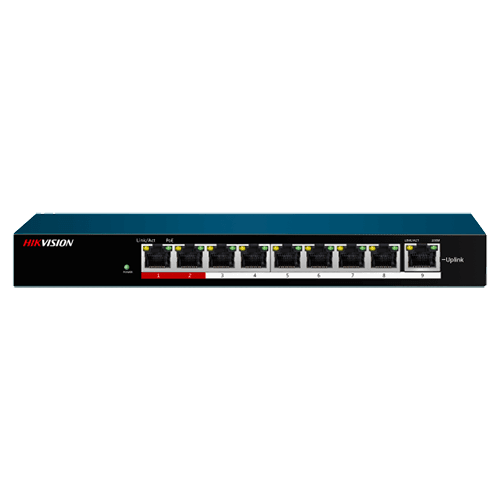
- 8 PoE ports, 58 W budget
- 100 Mbps uplink port
- 802.3af/at PoE
- Plug and play, no setup
DS-3E0109P-E/M
8-Port PoE Switch, 58 W
- 8 PoE ports, 58 W budget
- 100 Mbps uplink port
- 802.3af/at PoE
- Plug and play, no setup
PoE Ports
8 x 100M PoE ports
PoE Standard
IEEE802.3at/af
PoE power budget
58W
Mac Address Table
2 K
Switching Capacity
1.8 Gbps
Packet Forwarding rate
1.339 Mpps
Key specs
- 8 × 100 Mbps PoE ports (802.3af/at)
- 1 × 100 Mbps uplink port
- PoE budget 58 W
- Store-and-forward switching
- Max. 51 VDC
|
Network Parameters |
|
|
Port Number |
8 x 100M PoE ports, 1 x 100M Ethernet port. |
|
Port type |
RJ45 port, Full duplex, MDI/MDI-X adaptive |
|
Standard |
IEEE802.3, IEEE802.3u, IEEE802.3x |
|
Processing type |
Store-and-forward switching |
|
Ports with high priority |
1 to 2 ports |
|
Ports for long- distance transmission |
1 to 8 ports |
|
MAC address table |
2 K |
|
Exchange capacity |
1.8 Gbps |
|
Packet forwarding rate |
1.339 Mpps |
|
Internal cache |
1 Mbits |
|
Poe Power Supply |
|
|
Power Supply Standard |
IEEE 802.3af, IEEE 802.3at |
|
Power Supply Cable Core |
Supports 8-core power supply, Ethernet cable 1/2/3/6 and 4/5/7/8 provide simultaneous power supply |
|
PoE Port |
1 to 8 |
|
Max. port power |
30 W |
|
Max. machine power |
58 W |
|
Mechanical Structure |
|
|
Shell |
Metal material, fan-free design |
|
weight |
0.35 kg (0.77 lb) |
|
Dimensions (L × H × D) |
170 mm × 27.6 mm × 93.1 mm (6.7” × 1.1” × 3.7”) |
|
Environment |
|
|
Operating temperature |
0 C to 40 C |
|
Storage temperature |
–40 C to 85 C |
|
Relative humidity |
5% to 95% (no condensation) |
|
Power supply |
|
|
Power Supply Specification |
51 VDC, 1.35 A |
Know before you buy
Quick answers about the DS-3E0109P-E/M, and how it compares.
How many cameras can this PoE switch power?
Two limits apply: the number of PoE ports, and the total PoE budget in watts. Add up the maximum power of each camera from its datasheet and keep about 20% spare. Example: 16 cameras at 6 W each need 96 W, plus 20% is about 115 W, so a switch with a 125 W budget or more is right. A PoE port (802.3af) gives up to 15.4 W and a PoE+ port (802.3at) up to 30 W. PTZ cameras and cameras with heaters, strong IR or strobe lights need PoE+ or Hi-PoE (802.3bt). Not sure? Send us your camera list and we size it for you.
Unmanaged, smart or managed switch: which one do I need?
Unmanaged switches are plug and play, with nothing to set up: good for small systems. Smart (web managed) switches add a web page and app view for VLANs, port status, cable checks and, on many models, PoE watchdog, so you can find and fix problems from your desk. Managed (Layer 2+ or Layer 3) switches add full control, routing and ring protection for large sites, campuses and city projects. For most CCTV jobs with 8 to 48 cameras, a smart PoE switch is the best value. Ask us if you are not sure.